Tampilkan postingan dengan label your. Tampilkan semua postingan
Tampilkan postingan dengan label your. Tampilkan semua postingan
Minggu, 23 Februari 2014

Rabu, 05 Februari 2014
Selasa, 04 Februari 2014
WR NET 018 CC cdrking router plus your BM622 wimax Tutorial
WR-NET-018-CC cdrking router plus your BM622 wimax Tutorial.
I made this tutorial for your convenience and to resolve some problem in yahoo.com, YouTube, streaming and sometimes facebook, I hope this would resolve other issues regarding to this router problem and modem.


This is same with bridge type mode but since this model of router doesnt have an option for operation mode like the other router but let us assume that we will doing the bridge type mode.

Now lets go to wan setup!
6. On Setup menu click internet setup and follow the settings below. See picture below:
Note: Must click the option: Mac from PC on Mac Clone and click apply changes.

Now for the Wireless Setup.
7. On Menu click Wireless and follow the setup on the picture and click apply changes.
See picture below:

8. On Wireless Menu click Wireless Security then input your desire Encryption and Pre-shared key and click apply changes, wait a second to reboot. See picture below:

9. After all we have done with the settings turn off the router for a moment. Now Plug in your Rj45 cable from your Bm622 wimax to Lan port1 of your router. It should look like this. See picture below:
Note: Just leave the wan port open since we are doing Bridge mode. Just stick to the plan dude!

10. Finally, fire up the Wimax modem as well your Wifi router. Open up a browser and check whether if you have an Internet connection.
Note: Sometimes you have to restart your PC to work the settings as well the modem. For Instances you accidentally push the restart button on your router you have to this again, just follow the step from the start. Always do not forget your router default IP. 192.168.10.1(applicable for this router model )
I hope everybody will be happy and this will resolved the issue in yahoo.com, youtube.com, facebook and Streaming.
To those who still using Win XP and having trouble for Slow computers you can check this link.
I made this tutorial for your convenience and to resolve some problem in yahoo.com, YouTube, streaming and sometimes facebook, I hope this would resolve other issues regarding to this router problem and modem.


So, lets get started!!
Just Follow the instruction below:
Just Follow the instruction below:
1. Plug in your RJ45 cable to your 2nd Lan port of your router then to your PC.
2. Open a browser and type in address bar 192.168.10.1 then enter.
3. Log in to your router using [b]username:[/b]admin [b]password:[/b]admin.
4. On setup menu click local network change your IP address to 192.168.1.254 and subnet mask to 255.255.255.0 then click apply changes, wait for a second to reboot.
Note: The next time you access your router you have to type in the new recently changed IP address for your router.
Note: The next time you access your router you have to type in the new recently changed IP address for your router.
5. After you have done with the changes that I stated above, It should be look like this: See picture below:
Note: Please do not forget to disable the DHCP, click none and apply changes.

Now lets go to wan setup!
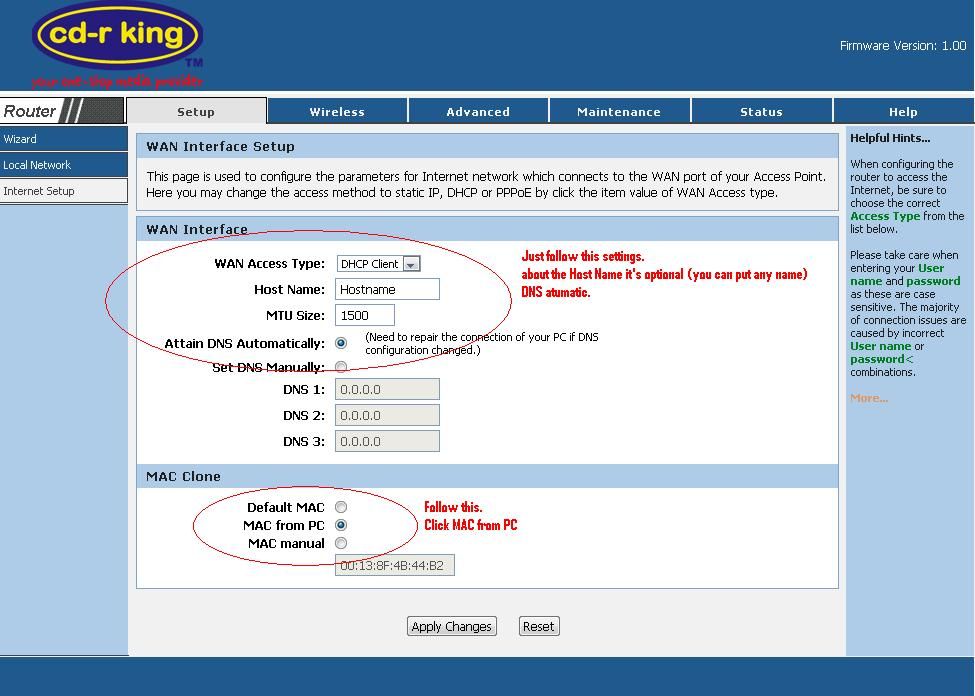
6. On Setup menu click internet setup and follow the settings below. See picture below:
Note: Must click the option: Mac from PC on Mac Clone and click apply changes.
Now for the Wireless Setup.
7. On Menu click Wireless and follow the setup on the picture and click apply changes.
See picture below:

8. On Wireless Menu click Wireless Security then input your desire Encryption and Pre-shared key and click apply changes, wait a second to reboot. See picture below:

9. After all we have done with the settings turn off the router for a moment. Now Plug in your Rj45 cable from your Bm622 wimax to Lan port1 of your router. It should look like this. See picture below:
Note: Just leave the wan port open since we are doing Bridge mode. Just stick to the plan dude!

10. Finally, fire up the Wimax modem as well your Wifi router. Open up a browser and check whether if you have an Internet connection.
Note: Sometimes you have to restart your PC to work the settings as well the modem. For Instances you accidentally push the restart button on your router you have to this again, just follow the step from the start. Always do not forget your router default IP. 192.168.10.1(applicable for this router model )
I hope everybody will be happy and this will resolved the issue in yahoo.com, youtube.com, facebook and Streaming.
To those who still using Win XP and having trouble for Slow computers you can check this link.
Senin, 27 Januari 2014
Getting The Ideal Restoration Services For Your Devices

In case you are in a situation and will need your business office tools repaired, contacting a talented photo printer service professional is important. This specific expert is able to visit your workplace, scrutinize your machine and try to make it doing work rapidly and if theres one thing mistaken that she / he just cant repair at this point, several specialists will offer you a lender unit which means you arent trapped without having anything to work with. In this way, it is possible to accomplish the necessary jobs even if your workplace equipment is not operating. Check out the Canon Printer Repairs.
A computer printer maintenance professional might also save a little money, quite often, a lot of people will go out and acquire different products even if it is not essential. That is because theyve already tried out to correct one thing them selves without the being successful, however, rather than throwing away cash, believing a professional in order to satisfy your requirements is greater alternative. As soon as the competent staff studies your equipment, that person the data and knowledge perform the endeavor correctly. As soon as the competent workman studies your unit, that person the information and experience perform the endeavor appropriately.
Besides your photo printer, a talented expert also can handle a number of the different devices in your company in the event you have some other photo copier, fax equipment, scanning if not more, this experienced ink jet printer restoration professional can almost certainly examine these kind of devices as well. Having the capacity to operate your small business or be employed in the office environment while not having to decelerate for appliance concerns is a huge benefit. Learn more about printer repair at http://photocopier-repairs.com.au. This is exactly why, if anything does initiate resulting in concerns or go wrong, selecting the ideal specialist can certainly help. The person defiantly will scrutinize, plus repair your different equipment which means you will not be away from commission rate ever again than.
Langganan:
Postingan (Atom)


